

Prerequisites
- Access to the hMailServer administration interface
- Your MailChannels SMTP username and password
Configure the relay
1
Configure the SMTP relay
In the hMailServer administration interface, navigate to Settings > Protocols > SMTP > Delivery of e-mail > SMTP Relayer.Configure the relay with the following values: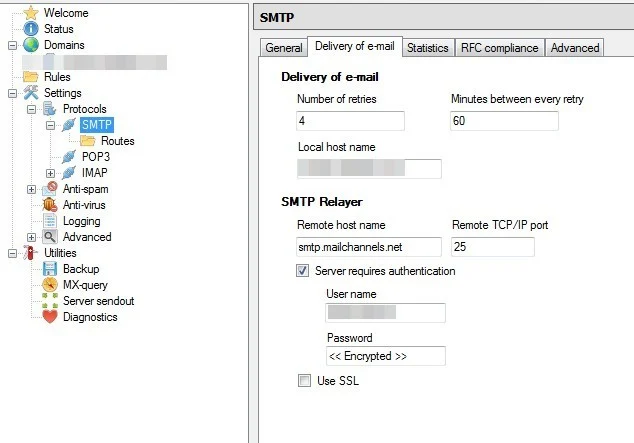
2
Enable the X-AuthUser header
MailChannels uses the Restart hMailServer for the change to take effect.
X-AuthUser header to identify the authenticated sender and track per-sender reputation. Messages without this header are treated as forwarded mail and subject to different policies.Locate hmailserver.ini in your hMailServer installation folder and add the following lines: