

How the quarantine works
Every message that arrives at your domain is scanned by MailChannels. When a message is identified as spam and your domain’s spam handling policy is set to quarantine, the message is stored by MailChannels rather than forwarded to your mail server. The message does not touch your inbox unless you explicitly release it. Quarantined messages are stored for up to 7 days, after which they are automatically deleted.The quarantine is only active when your domain admin has selected Quarantine Spam in Domain Settings. If your domain is set to block or flag spam instead, messages will not appear in the quarantine. See Configure spam handling for instructions.
Access your quarantine
- Sign in to the Domain Console.
- Click Logs in the left navigation.
- Select the Quarantined filter in the search bar and click Search.
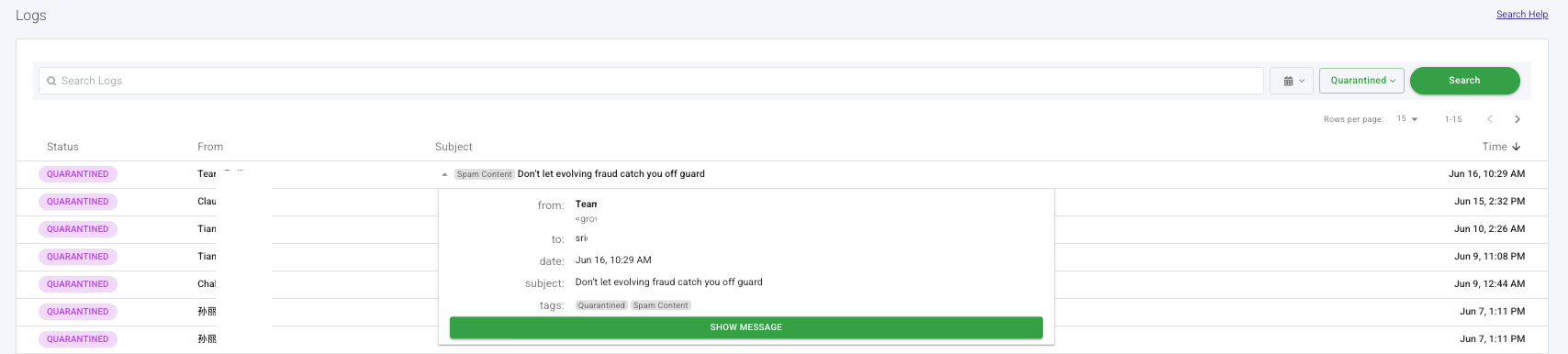
- Click the ? arrow to the left of the subject line to expand the message details. The panel shows the sender, recipient, date, subject, and tags.
- Click Show Message to render the full message content and verify whether it is legitimate or spam.
Take action on a message
Hover over any message row to reveal three action icons. Click the action you want to take: