

MailChannels Inbound Filtering is currently available through hosting provider partners. Before starting, confirm with your hosting provider that they support MailChannels and that it has been enabled for your domain.
Set up inbound filtering
1
Create a MailChannels account
Visit app.mailchannels.com/signup and create an account using an email address at your private domain. Public webmail addresses such as
@gmail.com or @yahoo.com are not accepted.After signing up, open the confirmation email from MailChannels and click Confirm Email Address to activate your account.2
Become a domain administrator
Creating an account does not automatically make you a domain administrator. Verify DNS ownership of your domain to gain full administrative privileges. See Domain admin promotion for instructions.
3
Configure MX records and downstream delivery
Configure a downstream record so MailChannels knows where to deliver filtered mail, then update your MX records to route inbound traffic through MailChannels. See MX & downstream records for full instructions.
Configure spam handling
Once filtering is active, configure how MailChannels handles messages identified as spam:- Sign in to the Domain Console.
- Click Domain Settings in the left navigation.
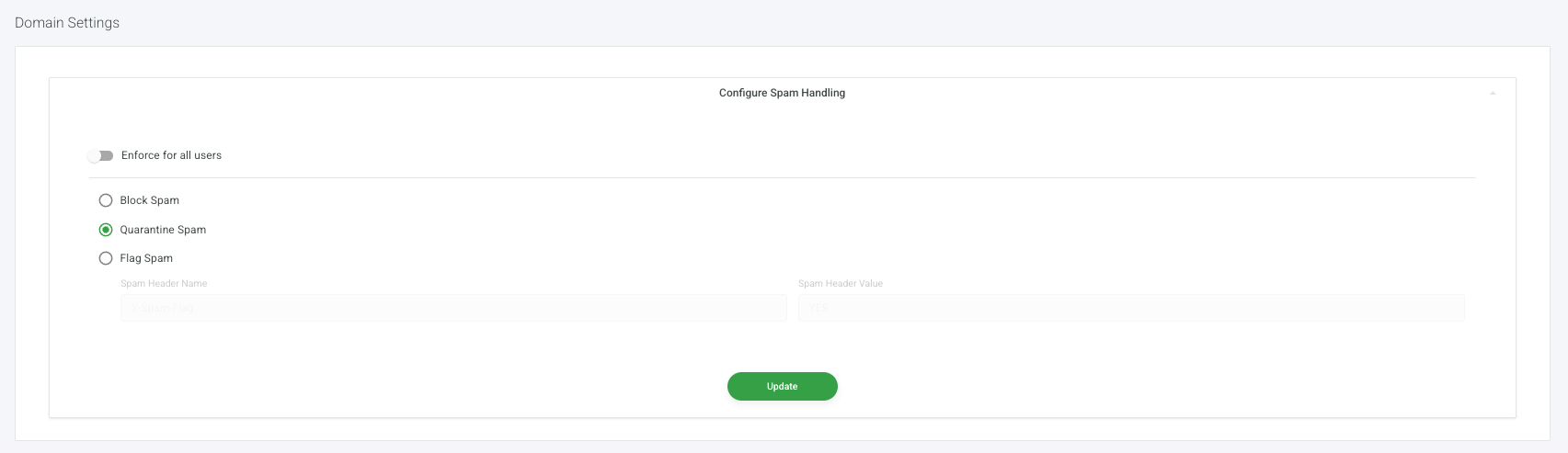
- In the Configure Spam Handling panel, select one of the following options:
- Block Spam ? spam is rejected at the connection level and not delivered.
- Quarantine Spam ? spam is held in quarantine for you to review. See Quarantine for how to manage quarantined messages.
- Flag Spam ? spam is delivered with a custom header. Enter the header name and value in the fields provided.
- To prevent users from overriding this setting for their own account, enable the Enforce for all users toggle.
- Click Update to save.
What happens next
With your MX records pointing to MailChannels and a downstream record configured, inbound filtering is fully active. All email sent to your domain passes through MailChannels before reaching your mail server. Use your Domain Console to manage your filtering settings.Quarantine
Review, release, and manage messages held in quarantine for your domain.
Safelists & Blocklists
Allow or block specific senders, domains, and IP addresses for your domain.
DMARC Enforcement
Configure how MailChannels handles messages that fail DMARC authentication.
Users Manager
View all mailbox users in your domain and see which users have email filtering active.