> ## Documentation Index
> Fetch the complete documentation index at: https://docs.mailchannels.com/llms.txt
> Use this file to discover all available pages before exploring further.
# MailChannels Email API for WHMCS
> Sell MailChannels Email API sub-accounts through your own WHMCS store. WHMCS bills your customers, and the plugin provisions sub-accounts, send limits, and credentials automatically.
MailChannels Email API for WHMCS is a free, MIT-licensed WHMCS addon and provisioning module for hosting providers. It lets you sell MailChannels Email API capacity as WHMCS products. WHMCS stays the authority for prices and billing. The plugin manages the MailChannels sub-account, its send limit, and the API key or SMTP password each customer uses to send.
Each customer gets an isolated [sub-account](/email-api/multi-tenancy) under your MailChannels parent account. One customer's sending behavior stays scoped to their own sub-account, so it does not become everyone's delivery problem.
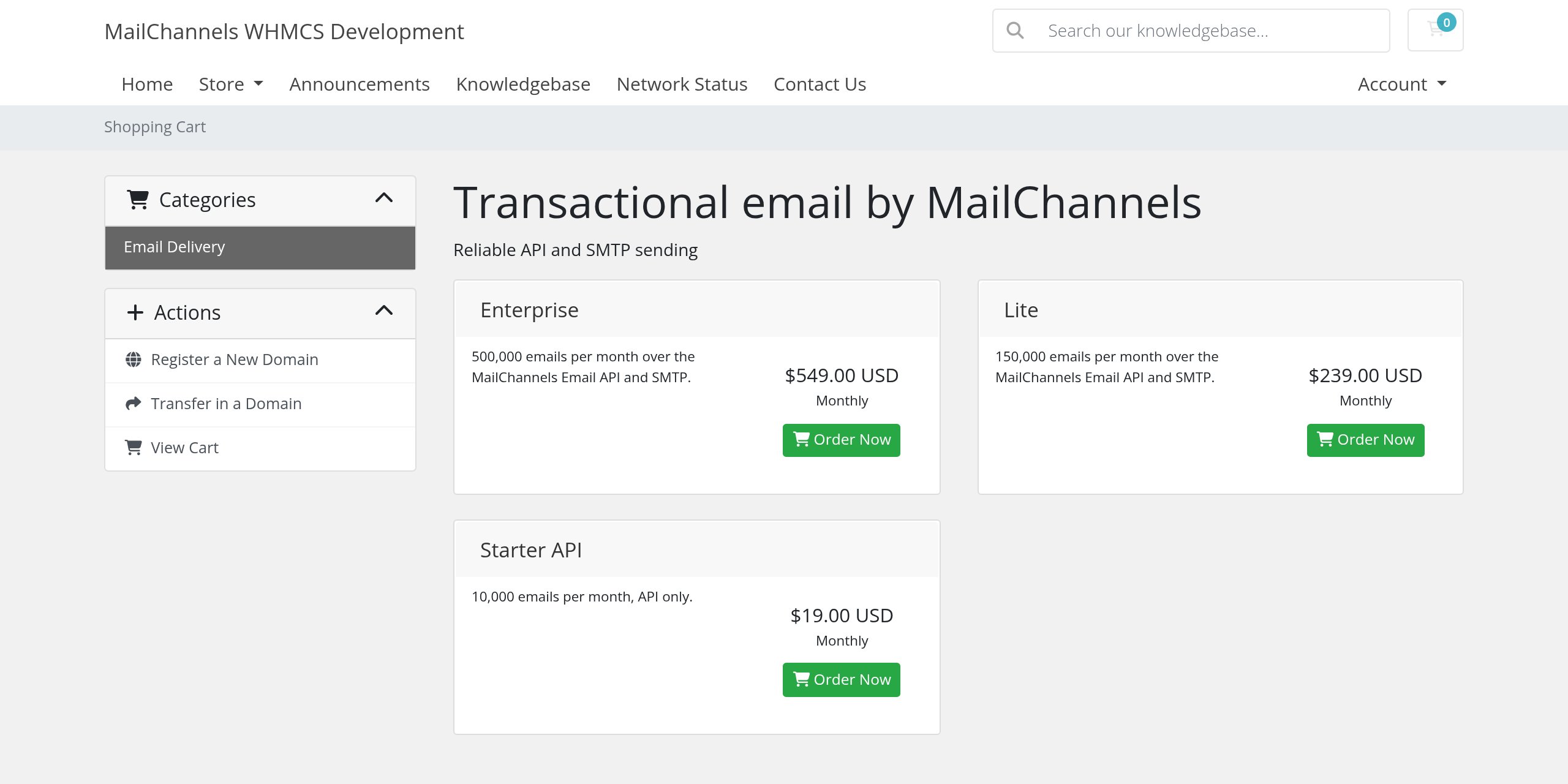
Plans you build with the plugin appear in your WHMCS store like any other product. You choose the names, descriptions, and prices.
 ## How it works
The plugin ships as two WHMCS modules that work together:
* **Addon module** (`modules/addons/mailchannels_email_api`). Adds a **MailChannels Email API** page to the WHMCS admin area. You use it to connect your parent account, build plans, preview and apply plan changes, watch shared capacity, retry failed provisioning, and reconcile services against MailChannels.
* **Provisioning module** (`modules/servers/mailchannels_email_api`). Attached to each WHMCS product. It creates, suspends, reactivates, upgrades, and terminates the customer's sub-account as WHMCS moves the service through its lifecycle. It also renders the customer's client area page.
When a customer pays for a plan, WHMCS calls the provisioning module. The module creates a sub-account with a deterministic handle, applies the plan's send limit, creates the credentials the plan requires, encrypts them with the WHMCS encryption API, and marks the service active. The customer then reveals their credentials from the client area and starts sending.
```text theme={null}
Customer pays in WHMCS
-> WHMCS runs the provisioning module
-> create sub-account (handle derived from the WHMCS service ID)
-> set the plan's send limit
-> create API key and/or SMTP password
-> encrypt secrets at rest and mark the service active
-> Customer reveals credentials in the client area and sends
```
## Key concepts
| Term | Meaning |
| - | - |
| Parent account | Your MailChannels Email API account. The plugin uses one parent API key to manage every sub-account it creates. |
| Sub-account | The isolated MailChannels account created for each WHMCS service. It has its own credentials, send limit, usage, suppressions, and webhooks. |
| Handle | The sub-account identifier. The plugin derives it from your installation and the WHMCS service ID, so it never contains customer identity or secret data. |
| Send limit | The number of messages a sub-account may send per MailChannels billing period. Every plan must define a positive send limit. |
| Credential mode | Whether a plan provisions an `api` key, an `smtp` password, or `both`. |
| Shared parent ceiling | Your parent account's own limit. It is the hard cap on all sub-accounts combined. See [Capacity and reconciliation](/plugins/whmcs/capacity-and-reconciliation). |
## Requirements
| Requirement | Supported |
| - | - |
| WHMCS | 9.0, 8.13 LTS |
| PHP | 8.2, 8.3 |
| MailChannels | An Email API parent account and a parent API key that can manage sub-accounts |
| Composer | Not required on the WHMCS server. The plugin bundles a namespace-scoped copy of the official PHP SDK. |
## Source code
The plugin is open source. Get it from the [Bitbucket repository](https://bitbucket.org/mailchannels/mailchannels-email-api-whmcs-plugin), then follow [Install the WHMCS plugin](/plugins/whmcs/installation).
## What you get
* Automatic sub-account provisioning after the first payment.
* Per-plan send limits and API, SMTP, or combined credential modes.
* A guided plan builder that creates ready-to-sell WHMCS products.
* Suspend, reactivate, package change, and terminate mapped to MailChannels operations.
* A capacity dashboard that compares plan allocations with your parent account's limit.
* Daily reconciliation that detects drift between WHMCS and MailChannels.
* A customer client area with usage, credential reveal, two-phase credential rotation, and a domain check.
* Credentials encrypted at rest and never written to logs, URLs, page HTML, or email.
## Get started
Clone the repository, copy the two module directories into WHMCS, and activate the addon.
Validate and store your parent API key.
Build sellable products with a send limit and credential mode.
Learn what happens on create, suspend, upgrade, and terminate.
Prices you set in WHMCS are your store prices. They are not official MailChannels pricing. You are billed by MailChannels for your parent account according to your MailChannels plan.
This documentation is built and hosted on [Mintlify](https://mintlify.com), a developer documentation platform.
## How it works
The plugin ships as two WHMCS modules that work together:
* **Addon module** (`modules/addons/mailchannels_email_api`). Adds a **MailChannels Email API** page to the WHMCS admin area. You use it to connect your parent account, build plans, preview and apply plan changes, watch shared capacity, retry failed provisioning, and reconcile services against MailChannels.
* **Provisioning module** (`modules/servers/mailchannels_email_api`). Attached to each WHMCS product. It creates, suspends, reactivates, upgrades, and terminates the customer's sub-account as WHMCS moves the service through its lifecycle. It also renders the customer's client area page.
When a customer pays for a plan, WHMCS calls the provisioning module. The module creates a sub-account with a deterministic handle, applies the plan's send limit, creates the credentials the plan requires, encrypts them with the WHMCS encryption API, and marks the service active. The customer then reveals their credentials from the client area and starts sending.
```text theme={null}
Customer pays in WHMCS
-> WHMCS runs the provisioning module
-> create sub-account (handle derived from the WHMCS service ID)
-> set the plan's send limit
-> create API key and/or SMTP password
-> encrypt secrets at rest and mark the service active
-> Customer reveals credentials in the client area and sends
```
## Key concepts
| Term | Meaning |
| - | - |
| Parent account | Your MailChannels Email API account. The plugin uses one parent API key to manage every sub-account it creates. |
| Sub-account | The isolated MailChannels account created for each WHMCS service. It has its own credentials, send limit, usage, suppressions, and webhooks. |
| Handle | The sub-account identifier. The plugin derives it from your installation and the WHMCS service ID, so it never contains customer identity or secret data. |
| Send limit | The number of messages a sub-account may send per MailChannels billing period. Every plan must define a positive send limit. |
| Credential mode | Whether a plan provisions an `api` key, an `smtp` password, or `both`. |
| Shared parent ceiling | Your parent account's own limit. It is the hard cap on all sub-accounts combined. See [Capacity and reconciliation](/plugins/whmcs/capacity-and-reconciliation). |
## Requirements
| Requirement | Supported |
| - | - |
| WHMCS | 9.0, 8.13 LTS |
| PHP | 8.2, 8.3 |
| MailChannels | An Email API parent account and a parent API key that can manage sub-accounts |
| Composer | Not required on the WHMCS server. The plugin bundles a namespace-scoped copy of the official PHP SDK. |
## Source code
The plugin is open source. Get it from the [Bitbucket repository](https://bitbucket.org/mailchannels/mailchannels-email-api-whmcs-plugin), then follow [Install the WHMCS plugin](/plugins/whmcs/installation).
## What you get
* Automatic sub-account provisioning after the first payment.
* Per-plan send limits and API, SMTP, or combined credential modes.
* A guided plan builder that creates ready-to-sell WHMCS products.
* Suspend, reactivate, package change, and terminate mapped to MailChannels operations.
* A capacity dashboard that compares plan allocations with your parent account's limit.
* Daily reconciliation that detects drift between WHMCS and MailChannels.
* A customer client area with usage, credential reveal, two-phase credential rotation, and a domain check.
* Credentials encrypted at rest and never written to logs, URLs, page HTML, or email.
## Get started
Clone the repository, copy the two module directories into WHMCS, and activate the addon.
Validate and store your parent API key.
Build sellable products with a send limit and credential mode.
Learn what happens on create, suspend, upgrade, and terminate.
Prices you set in WHMCS are your store prices. They are not official MailChannels pricing. You are billed by MailChannels for your parent account according to your MailChannels plan.
This documentation is built and hosted on [Mintlify](https://mintlify.com), a developer documentation platform.