> ## Documentation Index
> Fetch the complete documentation index at: https://docs.mailchannels.com/llms.txt
> Use this file to discover all available pages before exploring further.
# Client area
> What your customers see and can do on their MailChannels Email API service page in the WHMCS client area: usage, credential reveal, rotation, and domain checks.
Each MailChannels Email API service has a page in the WHMCS client area under **Services > My Services**. Customers use it to monitor usage, retrieve credentials, rotate them, and check a sending domain. No credentials are ever sent by email.
## Status and usage
The top of the page shows two cards:
* **Emails sent this period**. Messages sent against the plan limit, with a progress bar, the percentage used, and the number remaining. The bar turns amber at 80% of the limit and red at 100%. The card also shows the billing period dates, when MailChannels reports them, and when usage was last updated.
* **Status** and **Sub-account**. The service state, and the sub-account handle. SMTP customers use the handle as their username.
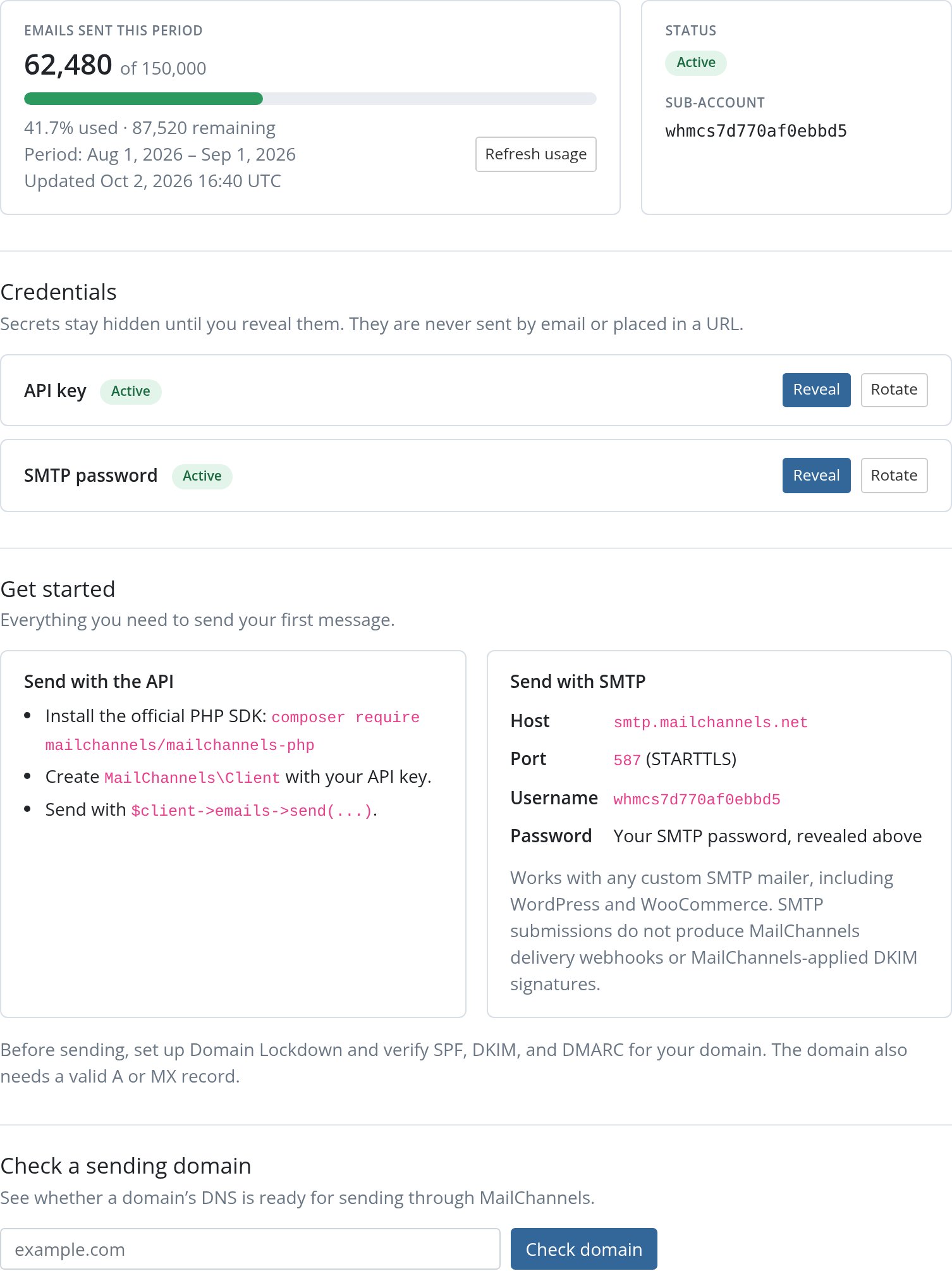 Usage is cached for 15 minutes. The page refreshes it automatically when the cache is stale. Customers can click **Refresh usage** to bypass the cache at any time.
If the service has not been provisioned yet, the page shows a notice instead of the cards.
WHMCS shows this panel only while the service is active. When a service is suspended, the customer sees the standard WHMCS suspended notice instead.
## Credentials
The **Credentials** section lists each module-managed credential with its type (**API key** or **SMTP password**) and status. Secrets are hidden until the customer asks for them.
### Reveal a credential
Clicking **Reveal** decrypts the secret and shows it in a read-only field under the credential, with a **Copy** button and a reminder to store it safely. For SMTP credentials, the username is shown the same way. It is the sub-account handle. The secret is hidden again when the customer leaves the page.
Usage is cached for 15 minutes. The page refreshes it automatically when the cache is stale. Customers can click **Refresh usage** to bypass the cache at any time.
If the service has not been provisioned yet, the page shows a notice instead of the cards.
WHMCS shows this panel only while the service is active. When a service is suspended, the customer sees the standard WHMCS suspended notice instead.
## Credentials
The **Credentials** section lists each module-managed credential with its type (**API key** or **SMTP password**) and status. Secrets are hidden until the customer asks for them.
### Reveal a credential
Clicking **Reveal** decrypts the secret and shows it in a read-only field under the credential, with a **Copy** button and a reminder to store it safely. For SMTP credentials, the username is shown the same way. It is the sub-account handle. The secret is hidden again when the customer leaves the page.
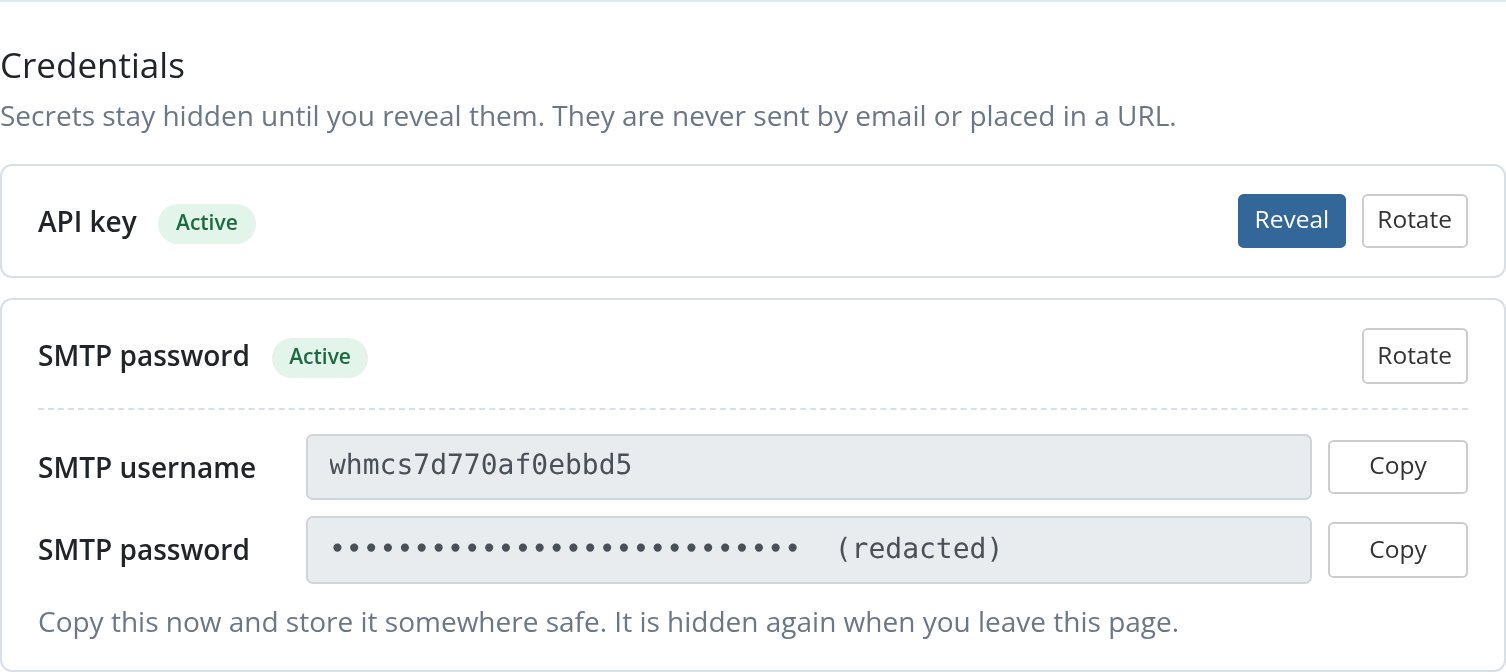 Reveals are ownership-checked and CSRF-protected POST requests. The response is sent with `Cache-Control: no-store` so browsers and proxies do not keep a copy. The plugin records the time of the reveal but never the secret itself.
Customers can reveal the same credential again later. Because the secret is stored encrypted in WHMCS, there is no need to rotate just to see it again.
### Rotate a credential
Rotation is two-phase so a customer never loses the ability to send:
The customer clicks **Rotate** next to the credential. The plugin creates a new credential at MailChannels, stores it encrypted, and reveals it immediately. The replacement is listed under the original with the status **Replacement, not yet confirmed**. The old credential keeps working.
The customer updates their application or SMTP settings with the new secret and confirms mail is sending.
The customer clicks **Confirm replacement works** next to the pending credential and accepts the confirmation prompt. The plugin revokes the old credential at MailChannels, erases its stored secret, and marks the replacement **Active**.
Reveals are ownership-checked and CSRF-protected POST requests. The response is sent with `Cache-Control: no-store` so browsers and proxies do not keep a copy. The plugin records the time of the reveal but never the secret itself.
Customers can reveal the same credential again later. Because the secret is stored encrypted in WHMCS, there is no need to rotate just to see it again.
### Rotate a credential
Rotation is two-phase so a customer never loses the ability to send:
The customer clicks **Rotate** next to the credential. The plugin creates a new credential at MailChannels, stores it encrypted, and reveals it immediately. The replacement is listed under the original with the status **Replacement, not yet confirmed**. The old credential keeps working.
The customer updates their application or SMTP settings with the new secret and confirms mail is sending.
The customer clicks **Confirm replacement works** next to the pending credential and accepts the confirmation prompt. The plugin revokes the old credential at MailChannels, erases its stored secret, and marks the replacement **Active**.
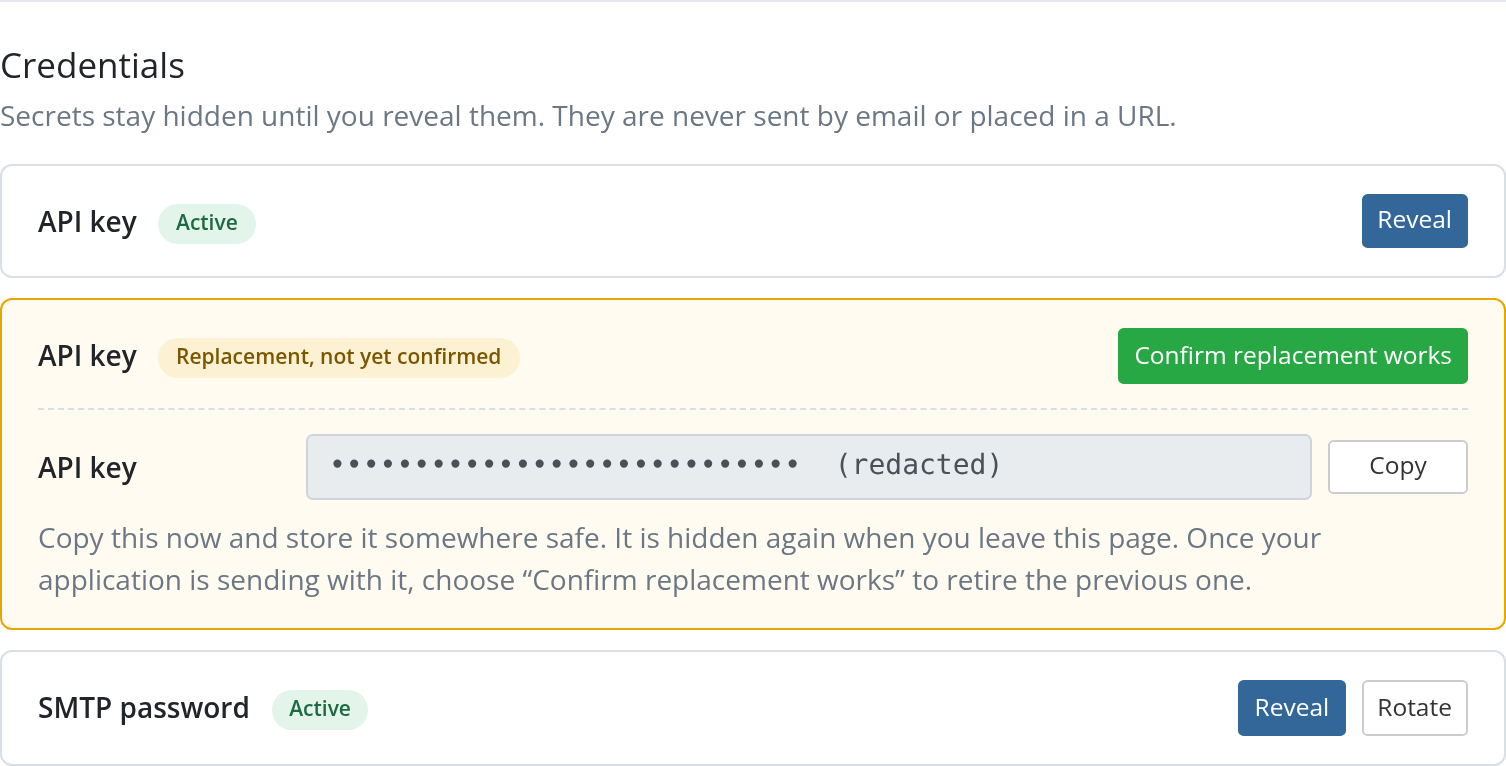 Until the customer confirms, both credentials remain valid. A pending replacement can be revealed again from the credential list. Only one replacement per credential type can be pending at a time, so **Rotate** is hidden until the customer confirms.
Rotation is available only for credential types the plan includes. A customer on an **API only** plan has no SMTP password to rotate.
## Getting started guidance
The page includes setup instructions that depend on the plan's credential mode.
### API plans
API plans show a **Send with the API** card. The customer installs the official SDK with `composer require mailchannels/mailchannels-php`, creates `MailChannels\Client` with the revealed API key, and sends through `$client->emails->send(...)`. Point customers to the [PHP quickstart](/email-api/php/quickstart) and [SDK examples](/email-api/examples) for complete code.
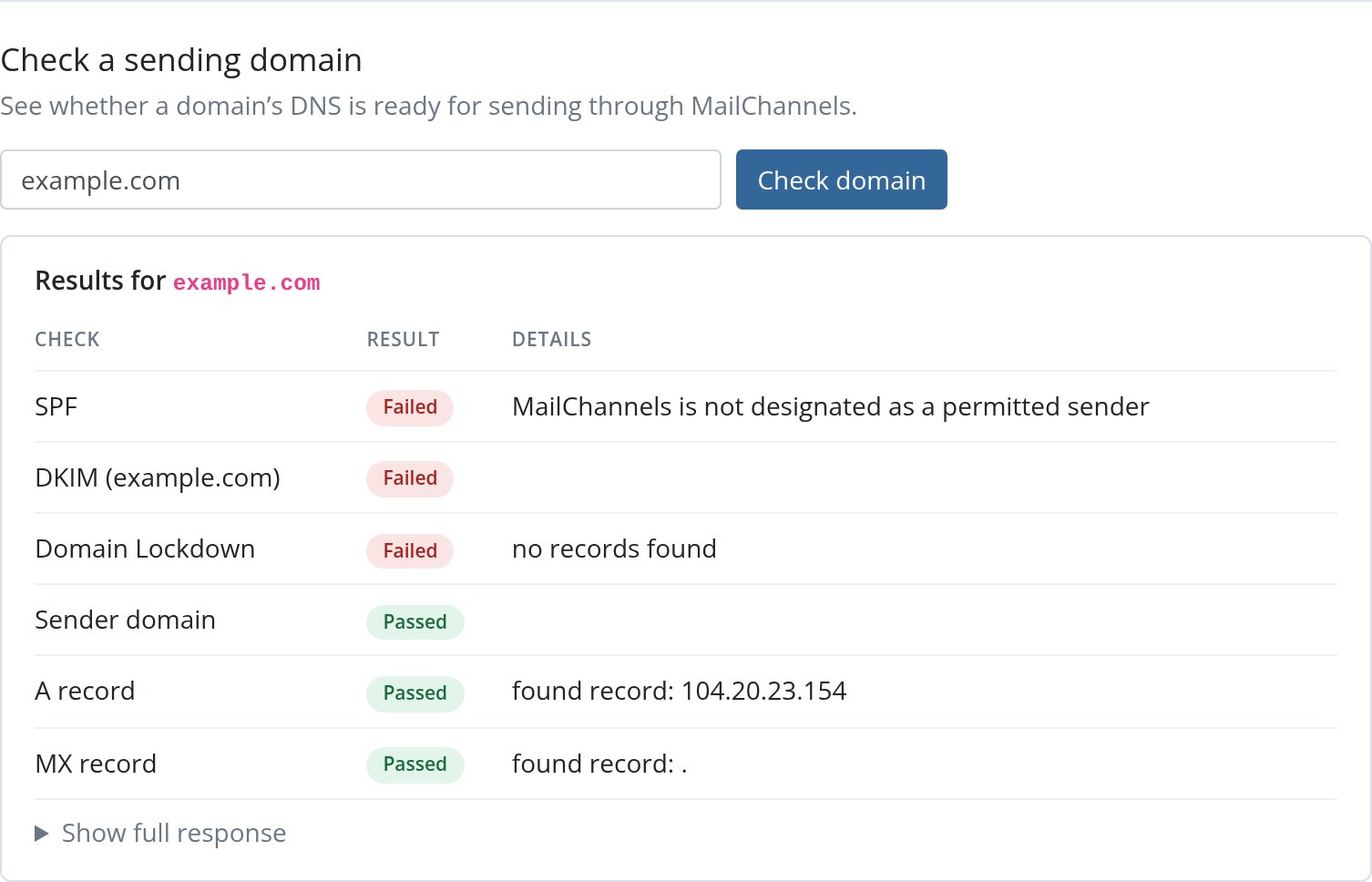
API plans also include a **Check a sending domain** form. The customer enters a domain and clicks **Check domain**. The plugin calls the MailChannels check-domain endpoint using the customer's own active API key.
The result is a table with one row per check: SPF, each DKIM entry, [Domain Lockdown](/email-api/domain-lockdown), the sender domain, and its A and MX records. Each row shows **Passed** or **Failed** and the explanation MailChannels returned. **Show full response** expands the complete JSON result.
Until the customer confirms, both credentials remain valid. A pending replacement can be revealed again from the credential list. Only one replacement per credential type can be pending at a time, so **Rotate** is hidden until the customer confirms.
Rotation is available only for credential types the plan includes. A customer on an **API only** plan has no SMTP password to rotate.
## Getting started guidance
The page includes setup instructions that depend on the plan's credential mode.
### API plans
API plans show a **Send with the API** card. The customer installs the official SDK with `composer require mailchannels/mailchannels-php`, creates `MailChannels\Client` with the revealed API key, and sends through `$client->emails->send(...)`. Point customers to the [PHP quickstart](/email-api/php/quickstart) and [SDK examples](/email-api/examples) for complete code.
API plans also include a **Check a sending domain** form. The customer enters a domain and clicks **Check domain**. The plugin calls the MailChannels check-domain endpoint using the customer's own active API key.
The result is a table with one row per check: SPF, each DKIM entry, [Domain Lockdown](/email-api/domain-lockdown), the sender domain, and its A and MX records. Each row shows **Passed** or **Failed** and the explanation MailChannels returned. **Show full response** expands the complete JSON result.
 ### SMTP plans
SMTP plans show a **Send with SMTP** card with settings for WordPress, WooCommerce, or any custom SMTP mailer:
| Setting | Value |
| - | - |
| Host | `smtp.mailchannels.net` |
| Port | `587` |
| Encryption | STARTTLS |
| Username | The sub-account handle, filled in on the card |
| Password | The revealed SMTP password |
Messages submitted over SMTP do not generate MailChannels delivery [webhooks](/email-api/webhooks) and are not DKIM-signed by MailChannels. Customers who need delivery events or hosted DKIM should use the API. See [Email API vs SMTP](/email-api/email-api-vs-smtp).
### DNS guidance
Every plan reminds the customer to configure [Domain Lockdown](/email-api/domain-lockdown) and to verify [SPF, DKIM, and DMARC](/email-api/spf-dkim-dmarc) before sending. The sending domain must also have a valid A or MX record, or MailChannels rejects mail from it.
For Domain Lockdown, the customer authorizes your parent account ID or their sub-account in the `_mailchannels` TXT record on their domain. The domain check on API plans tells them whether the record is correct.
## Access control
* Only the WHMCS client that owns the service can open the page. Requests for other services fail with `Access denied.`
* Every action is a POST protected by the WHMCS client-area CSRF token.
* Credentials never appear in URLs, ordinary page HTML, or the WHMCS welcome email.
* Errors are passed through the plugin's redactor before display, so API keys or passwords cannot leak through exception text.
See [Security and data flow](/plugins/whmcs/security) for details.
This documentation is built and hosted on [Mintlify](https://mintlify.com), a developer documentation platform.
### SMTP plans
SMTP plans show a **Send with SMTP** card with settings for WordPress, WooCommerce, or any custom SMTP mailer:
| Setting | Value |
| - | - |
| Host | `smtp.mailchannels.net` |
| Port | `587` |
| Encryption | STARTTLS |
| Username | The sub-account handle, filled in on the card |
| Password | The revealed SMTP password |
Messages submitted over SMTP do not generate MailChannels delivery [webhooks](/email-api/webhooks) and are not DKIM-signed by MailChannels. Customers who need delivery events or hosted DKIM should use the API. See [Email API vs SMTP](/email-api/email-api-vs-smtp).
### DNS guidance
Every plan reminds the customer to configure [Domain Lockdown](/email-api/domain-lockdown) and to verify [SPF, DKIM, and DMARC](/email-api/spf-dkim-dmarc) before sending. The sending domain must also have a valid A or MX record, or MailChannels rejects mail from it.
For Domain Lockdown, the customer authorizes your parent account ID or their sub-account in the `_mailchannels` TXT record on their domain. The domain check on API plans tells them whether the record is correct.
## Access control
* Only the WHMCS client that owns the service can open the page. Requests for other services fail with `Access denied.`
* Every action is a POST protected by the WHMCS client-area CSRF token.
* Credentials never appear in URLs, ordinary page HTML, or the WHMCS welcome email.
* Errors are passed through the plugin's redactor before display, so API keys or passwords cannot leak through exception text.
See [Security and data flow](/plugins/whmcs/security) for details.
This documentation is built and hosted on [Mintlify](https://mintlify.com), a developer documentation platform.