> ## Documentation Index
> Fetch the complete documentation index at: https://docs.mailchannels.com/llms.txt
> Use this file to discover all available pages before exploring further.
# Capacity and reconciliation
> Monitor shared parent capacity, understand over-allocation warnings, and use reconciliation to detect drift between WHMCS and MailChannels.
The addon page gives you a live view of how much capacity you have sold against your parent account, and a reconciliation job that checks every service against MailChannels.
## Capacity dashboard
Three cards appear at the top of **Addons > MailChannels Email API**:
 | Card | What it shows |
| - | - |
| Parent connection | Whether a parent API key is stored and when it was last validated. |
| Active allocations | The sum of plan send limits across all active and suspended services, and how many services that covers. |
| Shared parent ceiling | Your parent account's current-period usage and limit, fetched live from MailChannels. Shows **Unavailable** with the reason if the figures cannot be retrieved. |
### Over-allocation
Sub-account limits do not reserve parent capacity. Your parent account's limit is the hard ceiling for all sub-accounts combined. Once the parent limit is reached, MailChannels blocks sending from every sub-account until the next billing period.
The **Shared parent ceiling** card turns into a warning when the sum of plan allocations exceeds your parent limit. This is not an error. It means that if every customer used their full allocation, your parent account would run out first. Decide how much to over-sell based on your customers' actual usage, and watch the parent usage figure as the period progresses.
If parent usage approaches the limit, raise your MailChannels plan before customers are blocked. Blocked sends affect every customer at once, not just the heaviest ones.
For the full rules, see [Sub-account sending limits](/email-api/sub-accounts-limits).
## Reconciliation
Reconciliation compares each active or suspended service in WHMCS with its sub-account at MailChannels and records any drift.
### What is checked
For each service, the plugin:
1. Confirms the sub-account still exists.
2. Compares the sub-account's enabled state with the WHMCS lifecycle state.
3. Refreshes usage and compares the remote send limit with the plan limit.
4. Confirms every active or pending module-managed credential still exists at MailChannels.
### Drift codes
| Code | Meaning |
| - | - |
| `remote_sub_account_missing` | The sub-account no longer exists at MailChannels. |
| `remote_lifecycle_drift` | The sub-account is enabled but WHMCS has it suspended, or the reverse. |
| `remote_limit_drift` | The send limit at MailChannels differs from the plan limit. |
| `remote_api_credential_missing` | A module-managed API key was deleted outside WHMCS. |
| `remote_smtp_credential_missing` | A module-managed SMTP password was deleted outside WHMCS. |
Drift is recorded in the operation history as a failed `reconcile` operation with error code `remote_drift` and the list of codes in its context. The service's last error code is updated so you can find it later.
### Automatic reconciliation
The addon registers a WHMCS `AfterCronJob` hook. Once every 24 hours, after the WHMCS daily cron finishes, the hook reconciles up to 50 services. It is rate-limited so it never runs more than once per day, and it never writes secret material to cron output.
### Reconcile now
To run reconciliation on demand, click **Reconcile now** under **Recovery and reconciliation**. This bypasses the daily rate limit and checks up to 100 services. The addon reports how many were checked and how many have drift or an API failure. The card also shows when reconciliation last ran.
| Card | What it shows |
| - | - |
| Parent connection | Whether a parent API key is stored and when it was last validated. |
| Active allocations | The sum of plan send limits across all active and suspended services, and how many services that covers. |
| Shared parent ceiling | Your parent account's current-period usage and limit, fetched live from MailChannels. Shows **Unavailable** with the reason if the figures cannot be retrieved. |
### Over-allocation
Sub-account limits do not reserve parent capacity. Your parent account's limit is the hard ceiling for all sub-accounts combined. Once the parent limit is reached, MailChannels blocks sending from every sub-account until the next billing period.
The **Shared parent ceiling** card turns into a warning when the sum of plan allocations exceeds your parent limit. This is not an error. It means that if every customer used their full allocation, your parent account would run out first. Decide how much to over-sell based on your customers' actual usage, and watch the parent usage figure as the period progresses.
If parent usage approaches the limit, raise your MailChannels plan before customers are blocked. Blocked sends affect every customer at once, not just the heaviest ones.
For the full rules, see [Sub-account sending limits](/email-api/sub-accounts-limits).
## Reconciliation
Reconciliation compares each active or suspended service in WHMCS with its sub-account at MailChannels and records any drift.
### What is checked
For each service, the plugin:
1. Confirms the sub-account still exists.
2. Compares the sub-account's enabled state with the WHMCS lifecycle state.
3. Refreshes usage and compares the remote send limit with the plan limit.
4. Confirms every active or pending module-managed credential still exists at MailChannels.
### Drift codes
| Code | Meaning |
| - | - |
| `remote_sub_account_missing` | The sub-account no longer exists at MailChannels. |
| `remote_lifecycle_drift` | The sub-account is enabled but WHMCS has it suspended, or the reverse. |
| `remote_limit_drift` | The send limit at MailChannels differs from the plan limit. |
| `remote_api_credential_missing` | A module-managed API key was deleted outside WHMCS. |
| `remote_smtp_credential_missing` | A module-managed SMTP password was deleted outside WHMCS. |
Drift is recorded in the operation history as a failed `reconcile` operation with error code `remote_drift` and the list of codes in its context. The service's last error code is updated so you can find it later.
### Automatic reconciliation
The addon registers a WHMCS `AfterCronJob` hook. Once every 24 hours, after the WHMCS daily cron finishes, the hook reconciles up to 50 services. It is rate-limited so it never runs more than once per day, and it never writes secret material to cron output.
### Reconcile now
To run reconciliation on demand, click **Reconcile now** under **Recovery and reconciliation**. This bypasses the daily rate limit and checks up to 100 services. The addon reports how many were checked and how many have drift or an API failure. The card also shows when reconciliation last ran.
 ### Fix drift
Reconciliation detects drift but does not correct it automatically, because the right fix depends on why it happened.
| Drift | Typical cause | Fix |
| - | - | - |
| Lifecycle drift | Someone suspended or activated the sub-account in the Console. | Run **Suspend** or **Unsuspend** from the service's Module Commands to re-apply the WHMCS state. |
| Limit drift | Someone changed the limit in the Console. | Run **Change Package** on the service, or [apply plan changes](/plugins/whmcs/create-plans#change-an-existing-plan) for the product. |
| Credential missing | The key or password was deleted in the Console. | Ask the customer to rotate the credential in the client area, or run **Change Package** to recreate missing required credentials. |
| Sub-account missing | The sub-account was deleted in the Console. | Terminate the WHMCS service, or run **Create** again to provision a fresh sub-account with the same handle. |
## Operation history
The **Operation history** table at the bottom of the addon page lists the 20 most recent operations across all services. Each row shows:
* Time (UTC).
* WHMCS service ID, linked to the service in the admin area.
* Operation: Create, Suspend, Unsuspend, Change package, Terminate, Reconcile, Rotate create, or Rotate confirm.
* Outcome: **Success** or **Failed**.
* Error code, for failures.
* MailChannels request ID, when the API returned one.
### Fix drift
Reconciliation detects drift but does not correct it automatically, because the right fix depends on why it happened.
| Drift | Typical cause | Fix |
| - | - | - |
| Lifecycle drift | Someone suspended or activated the sub-account in the Console. | Run **Suspend** or **Unsuspend** from the service's Module Commands to re-apply the WHMCS state. |
| Limit drift | Someone changed the limit in the Console. | Run **Change Package** on the service, or [apply plan changes](/plugins/whmcs/create-plans#change-an-existing-plan) for the product. |
| Credential missing | The key or password was deleted in the Console. | Ask the customer to rotate the credential in the client area, or run **Change Package** to recreate missing required credentials. |
| Sub-account missing | The sub-account was deleted in the Console. | Terminate the WHMCS service, or run **Create** again to provision a fresh sub-account with the same handle. |
## Operation history
The **Operation history** table at the bottom of the addon page lists the 20 most recent operations across all services. Each row shows:
* Time (UTC).
* WHMCS service ID, linked to the service in the admin area.
* Operation: Create, Suspend, Unsuspend, Change package, Terminate, Reconcile, Rotate create, or Rotate confirm.
* Outcome: **Success** or **Failed**.
* Error code, for failures.
* MailChannels request ID, when the API returned one.
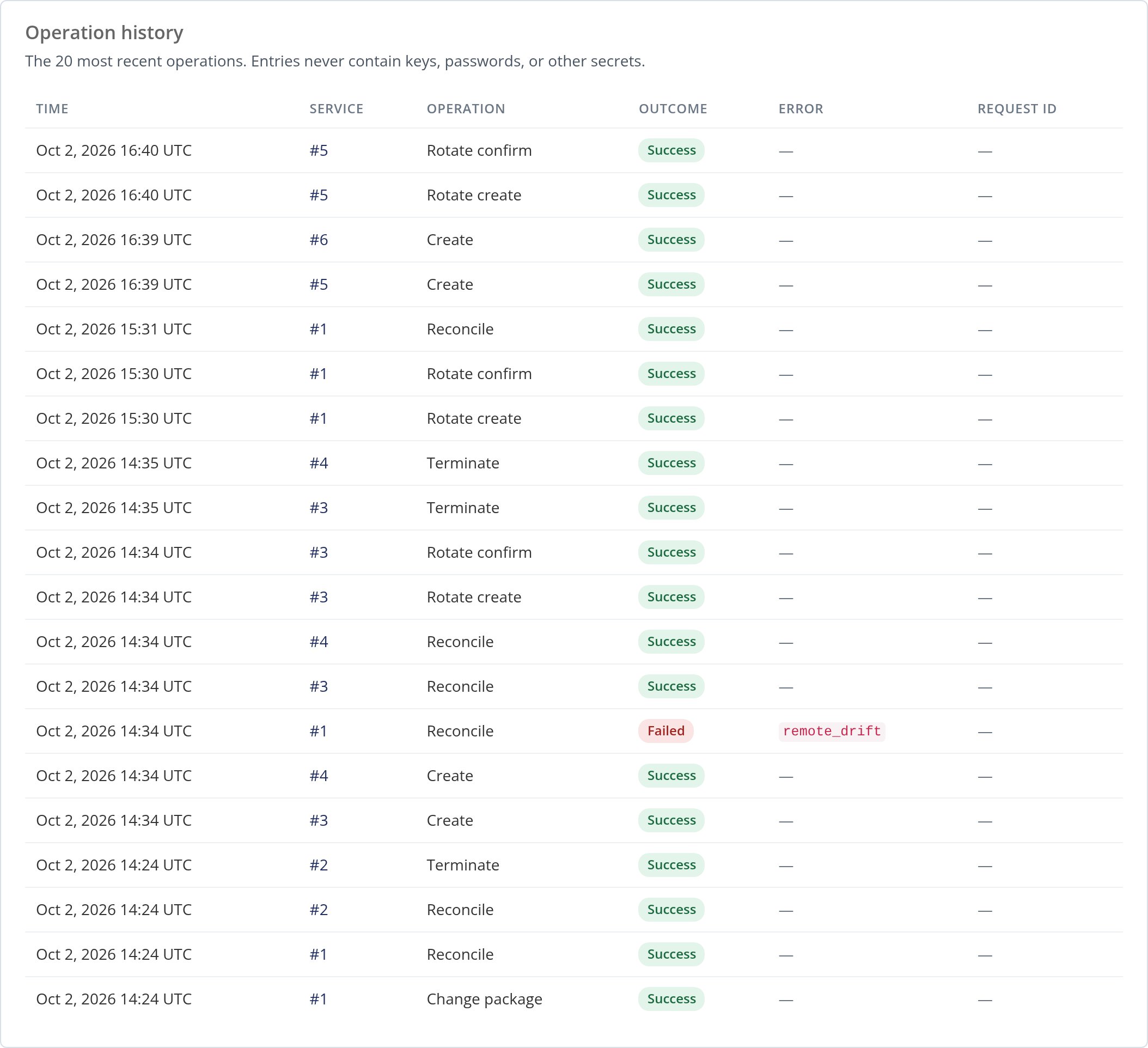 Every value passes through the plugin's redactor before it is stored. Include the request ID when you contact MailChannels support about a failed operation.
The table stores operations under their internal names, such as `change_package` and `rotate_create`. Use those names when you query the table directly.
For older entries, query the `mod_mailchannels_email_api_operations` table directly.
This documentation is built and hosted on [Mintlify](https://mintlify.com), a developer documentation platform.
Every value passes through the plugin's redactor before it is stored. Include the request ID when you contact MailChannels support about a failed operation.
The table stores operations under their internal names, such as `change_package` and `rotate_create`. Use those names when you query the table directly.
For older entries, query the `mod_mailchannels_email_api_operations` table directly.
This documentation is built and hosted on [Mintlify](https://mintlify.com), a developer documentation platform.